
Import Playlists from Other Music Services Straight in Apple Music!

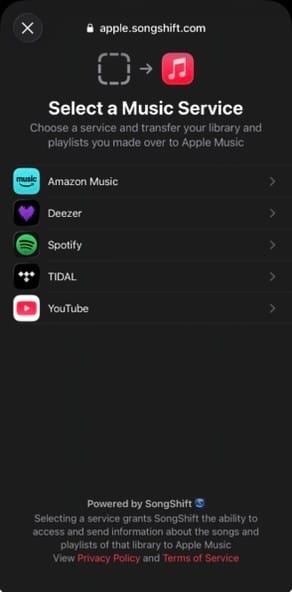
Transfer to Apple Music on your iPhone, iPad, or Android
Go to Music Settings:
On your iPhone or iPad, open the Apple Music app, then tap the My Account button
, or your photo or monogram.
On an Android device, open the Apple Music app, tap the More button
, then tap Settings.
Tap Transfer Music from Other Music Services.
Choose from the list of supported music services. Then sign in to the music service.
Choose what you want to transfer.
Tap Add to Library.
Wait for Apple Music to find matches for your music in the Apple Music catalog. Once this process is complete, you'll see one of the following messages:
Transfer Complete: Apple Music found matches for the music in the Apple Music catalog and added the music to your library.
Some Music Needs Review: Apple Music didn't find an exact match but found similar alternate versions for the music. Tap Review Now, choose an alternate version, then tap Save to add the music to your library.
6 days ago
Comments



Follow Steve M
By submitting, you agree to our Terms and Privacy Policy